Parameter Editor
Edit playable ad parameters with the visual editor, understand hierarchical overrides, and perform bulk updates
Overview
The Parameter Editor is the primary interface for customizing your playable ads. It provides a visual editor that dynamically generates input controls based on each parameter's type, with support for hierarchical overrides and bulk editing.
Navigate to a variant's detail page and open the Customize tab to access the editor.
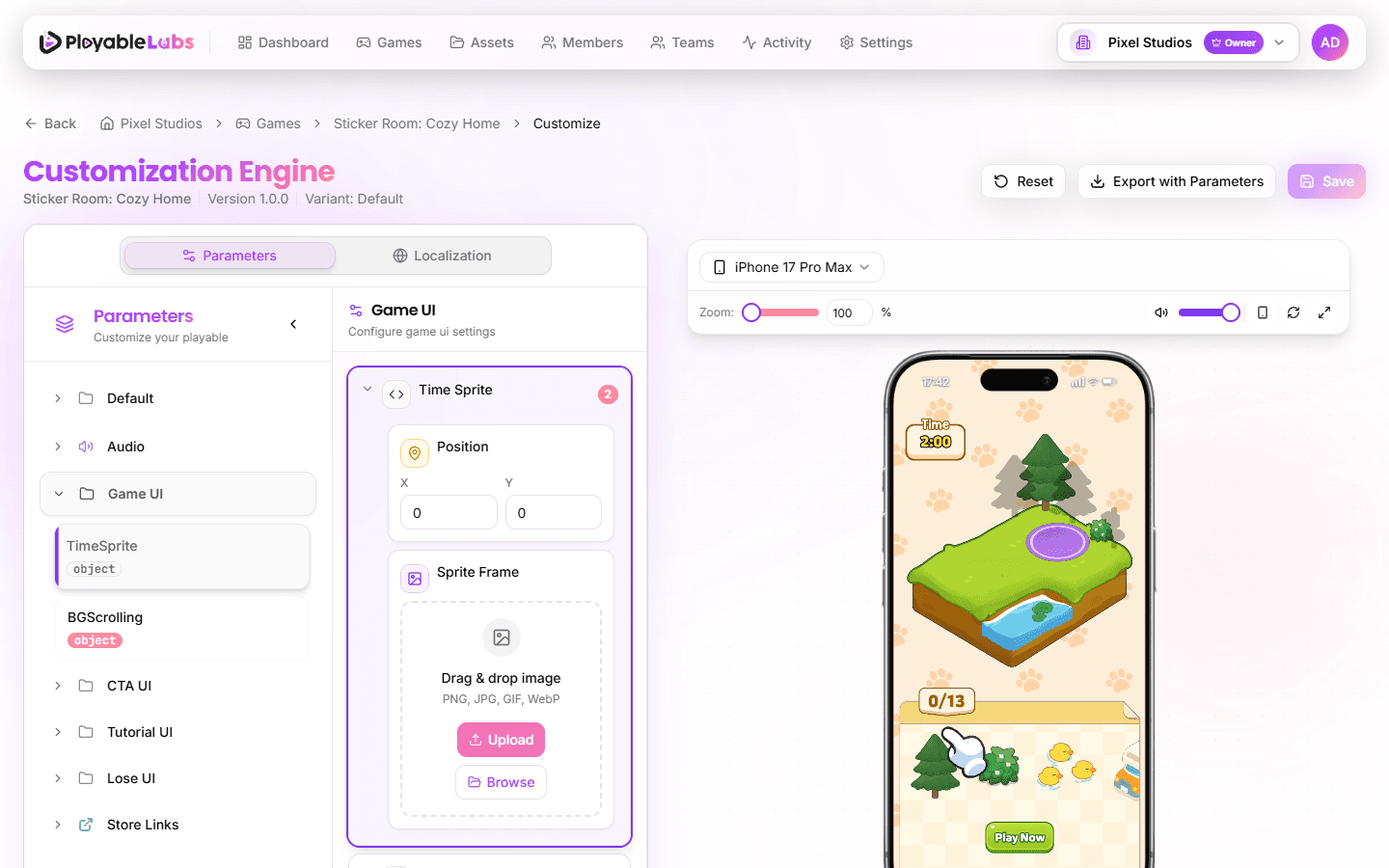
Parameter Types
The editor supports the following parameter types:
| Type | Control | Example |
|---|---|---|
text | Text input | Game title, button labels |
number | Number input with validation | Score multiplier, countdown timer |
range | Slider with min/max/step | Volume level, animation speed |
boolean | Toggle switch | Enable sound, show tutorial |
select | Dropdown menu | Theme selection, difficulty level |
color | Color picker with presets | Background color, text color |
image | Image upload with preview | Logo, background image |
audio | Audio upload with playback | Sound effects, background music |
video | Video upload with preview | Tutorial videos, animations |
asset_3d | 3D model upload (GLB/GLTF) | Character models, 3D assets |
coordinates | X/Y coordinate inputs | Element positioning |
table | Dynamic row-based editor | Data tables, item lists |
formatted_text | Rich text with styling controls | Styled labels with font/color/alignment |
font_family | Font selector with preview | Text font selection |
json | JSON editor for complex data | Advanced configuration |
object | Nested parameter group | Grouped settings |
Each parameter includes a key, type, value, and optional description that explains its purpose.
Editing Parameters
Basic Editing
- Open a variant and navigate to the Customize tab
- Browse parameters by category using the sidebar navigation
- Click any parameter value to edit it
- The change is reflected in the live preview immediately
- Click Save to persist your changes
Visual Indicators
- Modified badge -- Parameters you've changed show a rose-colored badge
- Required indicator -- Mandatory parameters display a red asterisk (*)
- Reset on hover -- Hover over a parameter to reveal the reset button, which reverts to the inherited value
Category Navigation
Parameters are organized into categories (e.g., "UI", "Gameplay", "Audio"). Use the Category Sidebar on the left to jump between groups without scrolling.
Localization-Aware Editing
Parameters marked as localizable show a globe icon. These parameters can have different values per locale. See Localization for details.
Hierarchical Overrides
PlayableLabs uses a four-level hierarchy for parameter values:
Variant > Version > Game > OrganizationWhen you view a variant's parameters, each value shows its source -- where the value is inherited from:
- variant -- Set directly on this variant (highest priority)
- version -- Inherited from the parent version
- game -- Inherited from the game level
- organization -- Default from the organization
How Overrides Work
- Organization defaults provide baseline values for all games
- Game-level values override organization defaults
- Version-level values override game values
- Variant-level values override everything (highest priority)
If you edit a parameter on a variant, it creates a variant-level override. To revert to the inherited value, click the Reset button next to the parameter.
Example: A game defines
backgroundColoras#FFFFFF. Version "Holiday" overrides it to#FF0000. Variant "Google Ads" inherits the red from the version, but Variant "Meta" overrides it to#00FF00.
Working with Media Parameters
Image, Audio, and Video
Media parameters provide multiple upload options:
- Upload -- Click to select a file or drag and drop directly
- Browse -- Select from your existing asset library
- Paste -- Paste images directly from clipboard (images only)
- AI Generation -- Generate audio using AI sound generation (audio only)
All media files are stored in your organization's R2 storage and converted to optimized CDN URLs automatically.
3D Model Parameters
For asset_3d parameters:
- Supports GLB and GLTF formats (max 50MB)
- Live 3D preview with interactive viewer
- Upload or browse from asset library
- Drag and drop support
Table Parameters
The table type provides a dynamic row-based editor:
- Add/remove rows with validation
- Drag to reorder rows (if enabled)
- Supports both primitive values and complex object rows
- Each row can contain any parameter type (text, number, color, etc.)
- Keyboard navigation for accessibility
Formatted Text Parameters
The formatted_text type offers rich styling controls:
- Text content with expandable editor
- Font family selection (9 web-safe fonts)
- Font size and color
- Text alignment (left, center, right, justify)
- Stroke width and color
- Live preview of formatting
Tips
- Use the live preview (right panel) to verify changes visually before saving
- Hover over a parameter's key name to see its description and data type
- The Reset button on individual parameters reverts to the inherited value
- Export your configuration before making large changes, so you can restore if needed
Next Steps
- Preview System -- Real-time preview with device simulation
- Localization -- Multi-language parameter values